

How to review A/B test results in Shopify Sidekick
Review ABConvert A/B test results in Shopify Sidekick. Compare revenue per visitor, AOV, conversion, and audience patterns before changing your store.
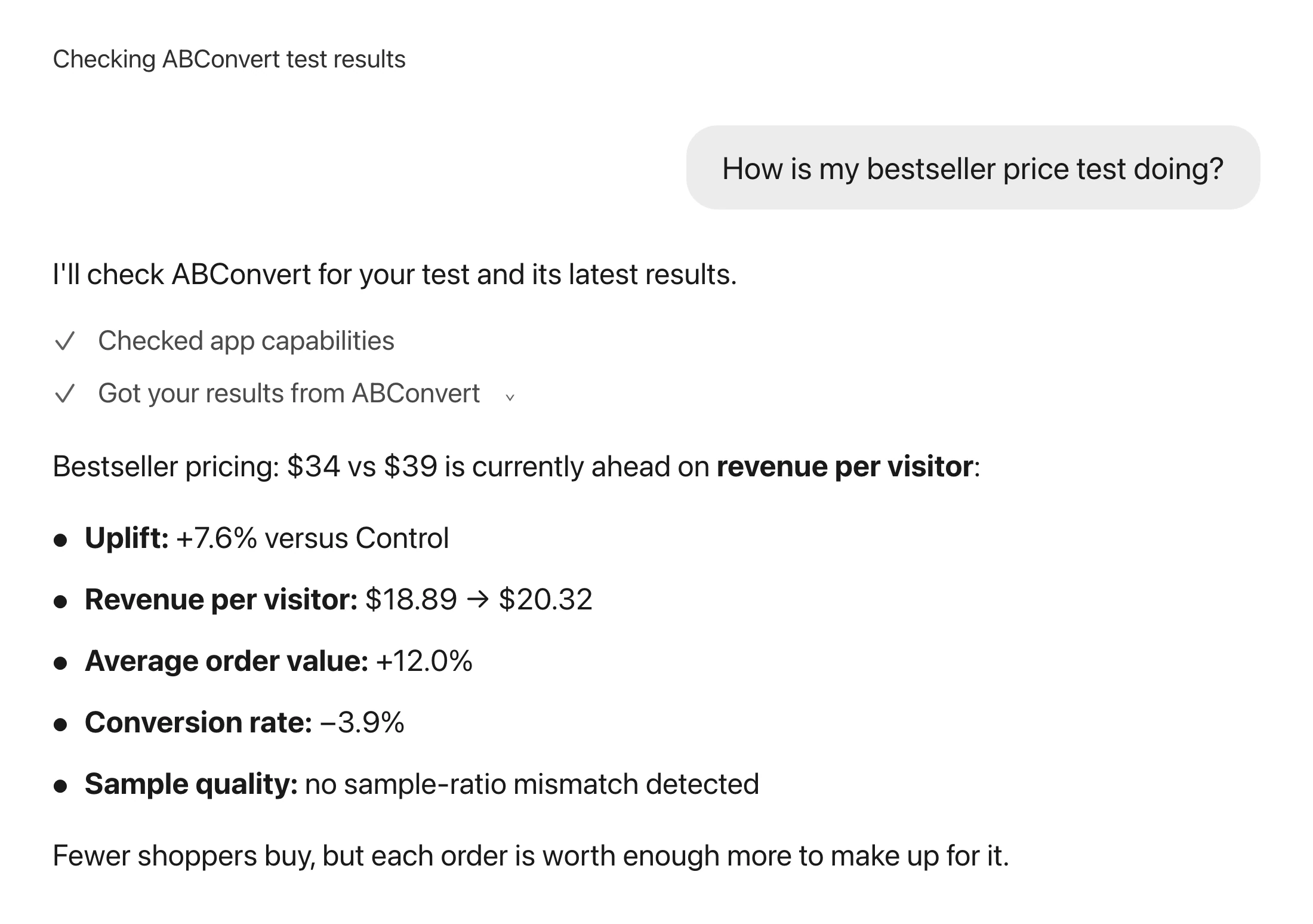
Your price test has a higher average order value, but a lower conversion rate.
Should you keep the higher price, leave the test running, or investigate something else?
One metric cannot answer that. You need to see how the numbers fit together and whether the result is ready to use. If you already ask Shopify Sidekick about your store, you can bring your ABConvert test questions into that same conversation. You do not need a separate ChatGPT or Claude account for this workflow.
01Does a bigger basket mean more revenue per visitor?
Not necessarily. Higher average order value (AOV) can be offset by fewer shoppers buying. Revenue per visitor helps you read those changes together; it still is not profit.
Instead of asking only whether AOV increased, try:
For [test name] in ABConvert, compare revenue per visitor, average order value, and conversion rate. Include any data-quality warnings.
Ask for the test's date range and measurement view too. A number is useful only when you know what it measures. If product costs are set up, you can also ask about profit per visitor. If costs are missing, profit metrics are unavailable; revenue is not a substitute.
Our price testing guide explains how to choose the metric for that decision.
02Does the pattern look different on mobile and desktop?
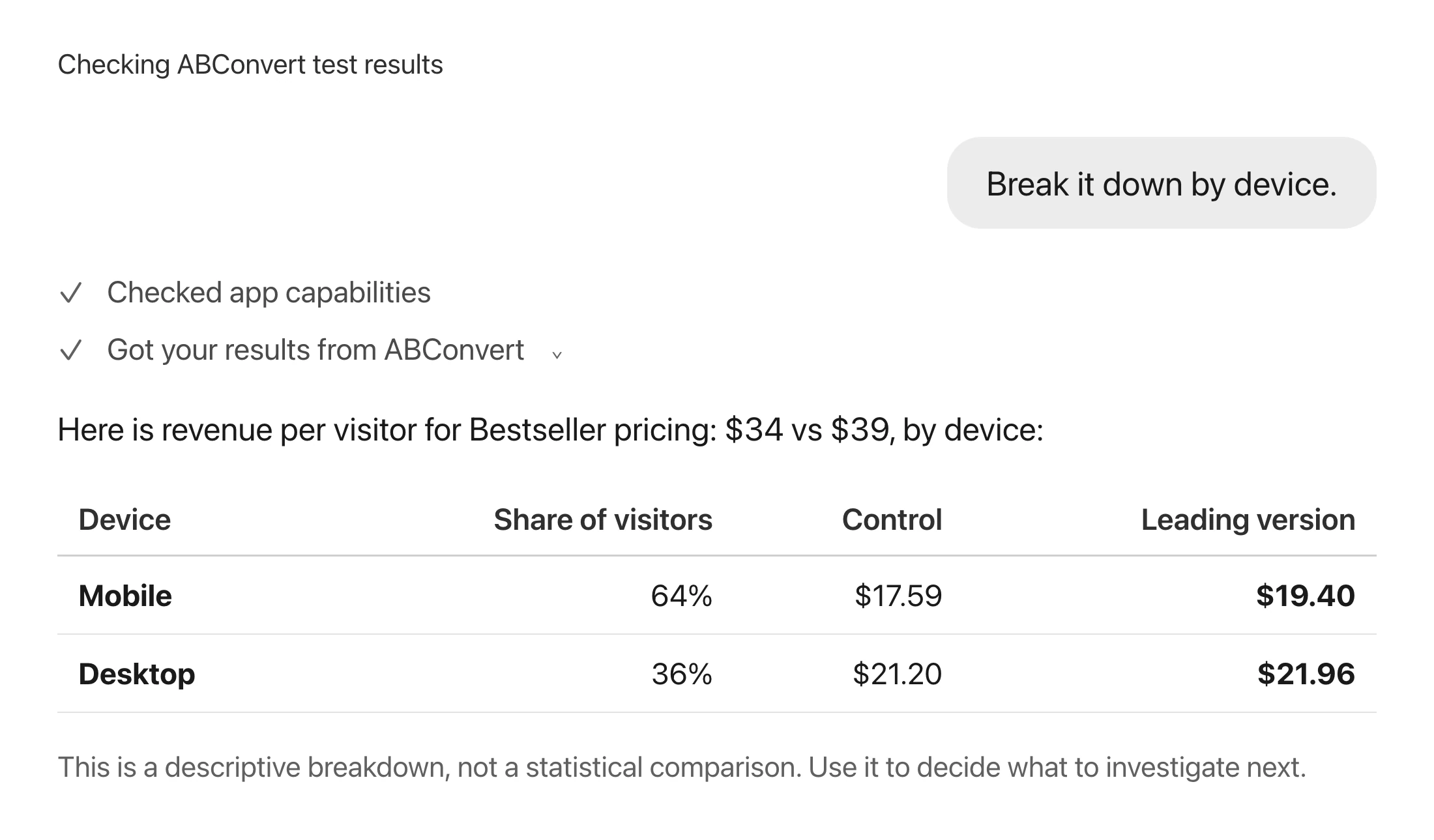
A storewide average can hide a useful follow-up question. Ask whether the pattern differs by device before deciding where to investigate next:
Break down [test name] in ABConvert by device for [start date] through [end date]. Show the date range used.
You can also ask about supported dimensions such as country, new or returning visitors, traffic channel, and UTM campaign.
A breakdown is descriptive. It does not include a statistical comparison, so a stronger-looking row does not establish a winning segment. Use it to form a follow-up hypothesis, not to justify a rollout on its own.
03What should you check before acting on an answer?
Confirm the test, date range, measurement view, and filters. Check warnings such as low sample size or sample ratio mismatch, which means the traffic split may not match the expected allocation.
Results may use the latest completed calculation, not a fresh calculation at the exact moment you ask. If a test has no results or a calculation is still refreshing, that is a status to respect, not a reason to guess.
Follow the test's Analytics link to inspect the full comparison, refresh results, or export orders. Sidekick makes the review more approachable; it does not remove the need for enough evidence.
04Questions about reviewing tests in Sidekick
Can Shopify Sidekick read my A/B test results?
Yes, through ABConvert's Sidekick data extension when it is available in your store. The extension provides ABConvert test status, results, data-quality warnings, audience breakdowns, and recent test history. It is not a claim that Sidekick can read every testing app's data automatically.
Do I need ChatGPT, Claude, or an MCP connection?
No separate AI assistant account, API token, or MCP connection is needed for this Sidekick workflow. You need ABConvert and Sidekick available in the same Shopify store, and you may be asked to approve a read request. If you prefer an external assistant, our API and MCP guide describes that separate route.
Can Sidekick change or stop an ABConvert test?
No. This data extension is read-only. It cannot create, edit, start, pause, or end a test. Those actions stay in ABConvert, with the decision in your hands.
Can I ask about profit or audience differences?
Yes, with limits. Profit metrics require product costs to be set up. Audience breakdowns are descriptive and do not establish statistically significant segment winners. Check the metric, scope, and warnings before treating an answer as evidence for a store change.
What if I do not know which test to review?
Start with "List my active ABConvert tests." You can then ask which active tests have a winner ready to review, or request a named test's recent history and Analytics link. A result ready for review is not an instruction to roll it out automatically.
05Try it with one decision you are unsure about
Pick a price, shipping, or page test you are already running. Ask what the revenue and conversion readings say together, then follow the question that matters for your store.
The Sidekick data extension guide covers access and supported questions. Shopify's Sidekick overview explains the assistant itself. If the beta is not available in your store, contact support rather than assuming a different prompt will bypass access.
Understand one test before changing your store
Use the setup guide and example questions. ABConvert and Sidekick must be available in the same store; the extension is a read-only beta.